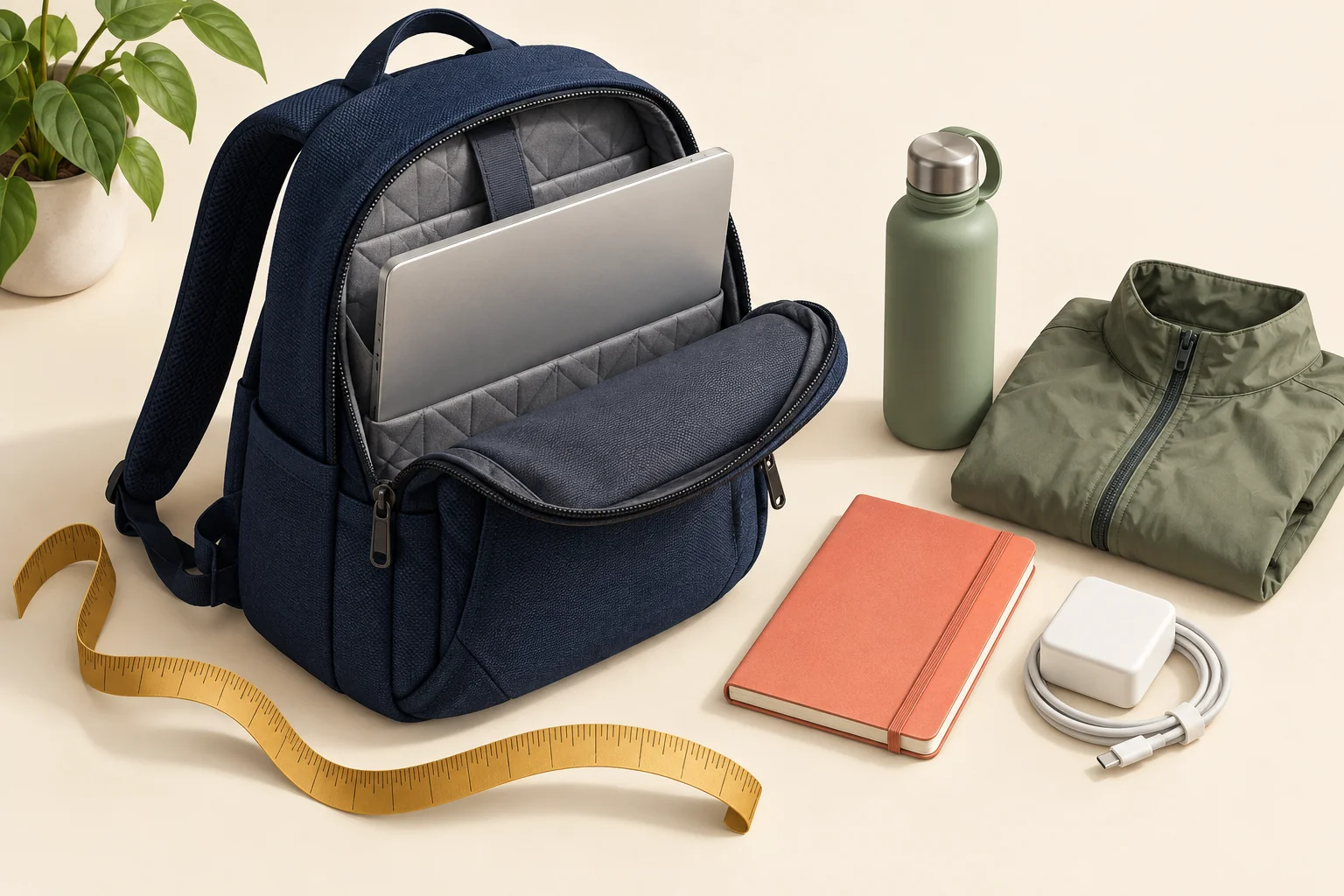
Choose employee backpacks by the equipment they must carry, then check comfort, organization and decoration on a physical sample. A laptop-size label is a starting point, not proof that your company's devices will fit. Before ordering, test the actual laptop—with its normal protective case—alongside the charger, bottle and other things employees bring to work.
The best company backpack is not necessarily the largest, most expensive or most recognizable. It is the one that works for the recipient's ordinary day. A compact pack can suit someone carrying a lightweight computer between home and the office; the same bag may frustrate someone transporting a workstation, accessories and lunch.
This guide is published by Brand Sauce from a company-merchandise planning perspective. Manufacturer examples illustrate specifications to check, not a tested ranking or a promise of availability through Brand Sauce. Product details were checked September 22, 2026; confirm the exact style, decoration and destination before ordering.
Start with a carry list, not a logo mockup
Ask IT for the models employees actually use, including larger devices issued to specialized teams. Ask a few recipients what travels with them. You need enough detail to test fit, not a survey of everyone's possessions.
Build a simple load profile: computer and case, charger, mouse or headset, notebook, bottle, and any lunch container or clothing. Separate essential equipment from optional extras. A backpack that accommodates the company laptop only when the employee leaves its protective case at home has failed the intended use.
| Typical use | Prioritize | Test before approval |
|---|---|---|
| Light office commute | Easy laptop access, manageable overall size, a useful quick-access pocket | Retrieve the computer without unpacking everything else |
| Transit commute with lunch | Usable main compartment, bottle storage, comfortable loaded carry | Pack the actual lunch container without pressing it against the laptop |
| Mobile technical work | Device clearance, accessory organization, secure closures | Fit the larger laptop and its power supply together |
| Frequent business travel | Accessible tech compartment, luggage attachment if needed, useful document storage | Try the attachment on a real suitcase and check the packed dimensions |
Use these as selection profiles, not rigid job-title rules. Two people on the same team can have different commutes and carry preferences. If the backpack is a gift rather than required equipment, offer another useful option to people who already have a bag they like.
Verify laptop fit in three dimensions
Record the device's closed width, depth and thickness, including its case if one is normally used. Compare these with the usable laptop compartment, not the backpack's outside dimensions. Also check the opening: a device can appear compatible on paper yet be difficult to pass through a narrow zipper or curved corner.
Supplier language deserves a careful read. SanMar's Port Authority Daily Commute Backpack BG226 specification separately lists laptop dimensions and overall bag dimensions, and qualifies its fit claim as covering most 15-inch laptops. That is a useful example of why a screen-size description should not become an unqualified promise on your employee store.
When dimensions are ambiguous—particularly which measurement describes the pocket versus the intended device—ask the supplier to clarify. Do not silently reinterpret a measurement to make the order work. A removable sleeve adds another fit variable; test the complete combination.
- Insert the device gently. It should not require force or stretching the opening.
- Close the compartment normally. Check corners and zipper clearance with the computer fully seated.
- Add the everyday load. Confirm that the charger and other contents do not make removal difficult.
- Check access again. Open, remove and replace the computer while the bag remains otherwise packed.
- Record the exact result. Save the laptop model, case used, bag style and any limitation.
This is a practical compatibility check, not a drop-protection certification. Do not perform impact tests with company electronics or translate padding into an unsupported damage-prevention claim. If IT has transport requirements, those requirements should define the test.
Evaluate usable space, not liters alone
Capacity helps narrow a shortlist, but it does not explain how your equipment fits together. Two packs with similar advertised volume can organize that space differently. Decide whether employees need one flexible main compartment, a separate tech section, or several smaller pockets, then test the arrangement with representative contents.
A dedicated charger pocket can be useful for someone carrying a bulky power supply. It can be unnecessary for someone who keeps a charger at each desk. A separate laptop opening may simplify access, but only if the employee can reach it comfortably while the rest of the bag is packed.
For a concrete design example, the Timbuk2 Q Laptop Backpack 2.0 describes a rear computer pocket, bottom power-brick pocket and luggage pass-through. Those are features to evaluate against a carry list, not evidence that this model is best for every employee. We have not independently tested it.
Check the bottle pocket with the actual bottle you plan to offer. Assess insertion, retention and access when the main compartment is full. If you're selecting both items for a welcome kit, review our employee drinkware guide alongside the bag sample; a useful bottle and a useful backpack do not automatically make a compatible pair.
Test comfort and access with a loaded sample
An empty backpack can conceal the issues that matter in use. Load the sample with representative equipment and invite a few colleagues with different body sizes and carry preferences to try it. Keep feedback specific: where does the bag sit, do the straps adjust adequately, and which pocket is awkward to reach?
Ask testers to walk a normal indoor route, put the bag on and take it off, use the grab handle, and open the compartments on a desk. If there is a luggage pass-through, try it on the kind of suitcase recipients use. These observations inform a purchasing decision; they are not medical or ergonomic claims.
Make a short record rather than collecting vague ratings:
- Device and normal accessories fit without forced closures.
- Straps can be adjusted comfortably by the people testing the sample.
- Zipper pulls and handles are easy for testers to use.
- Frequently needed items can be reached without emptying the bag.
- The packed bag works for the intended commute or office routine.
If one person cannot use the chosen style comfortably, do not treat that as an objection to overcome. For a gift, offer an alternative. For required equipment, route the need to the responsible workplace team rather than forcing a merchandise choice.
Keep weather and care claims precise
Do not upgrade “water-resistant” into “waterproof” in your store copy. Osprey's roll-top backpack guidance distinguishes water-resistant versions from waterproof designs with different construction. The practical lesson is to verify the exact model and its conditions of use, rather than infer protection from a brand name, fabric appearance or closure shape.
For employees regularly walking in rain, ask what protection the finished, decorated bag provides and whether additional protection is recommended for electronics. Do not use a sample's performance in a casual splash test as a new product claim.
Care information also belongs in the buying decision. Osprey's pack-cleaning guide recommends gentle cleaning and air drying, and advises against machine washing. That is brand guidance, not a universal instruction for every backpack. Share the selected product's own care directions and ask whether the decoration changes them.
A bag intended for an occasionally dusty commute has a different maintenance requirement from one carried into a messy working environment. If cleaning expectations are demanding, resolve them before choosing a fabric or embellishment.
Approve the decorated bag, not just the digital proof
Logo placement is a functional decision as well as a visual one. The approved location should work with the bag's pockets, seams and construction. Ask the decorator how they will access the panel, what artwork detail the method can reproduce, and whether the proposed application has any restrictions.
The BG226 decoration sheet identifies different front-panel locations and notes that usable decoration area depends on the method and equipment. It also flags care when applying heat to polyester. Those details should trigger a discussion with the actual decorator, not a blanket decision that every backpack can accept the same logo treatment.
Approve a finished sample of the proposed style, color, placement and method when the commitment warrants it. Open every compartment afterward. Check that pockets remain functional, inspect the inside behind the decoration, and confirm the visual result with the bag both empty and loaded. Our embroidery-versus-printing guide explains the broader method tradeoffs, but bag construction still needs its own review.
Keep a photograph and written approval of the final sample. For reorders, confirm that the product revision and decoration setup still match. A familiar style name is not a substitute for confirming what will actually be supplied.
Choose the assortment and order model together
For an ongoing employee store, start with a small number of clearly differentiated choices: for example, a compact everyday option and a roomier option for larger carry loads. Describe the difference in useful terms, not simply “standard” and “premium.” Avoid implying that people with different equipment needs deserve different levels of recognition.
A gift program can also include a non-bag alternative. Our guide to letting employees choose their gifts covers that broader principle. The backpack page itself should still explain tested device compatibility, dimensions, organization, care and decoration.
| Order approach | When it can fit | What to verify |
|---|---|---|
| On-demand decoration | Ongoing individual selections with uncertain demand | Exact product eligibility, minimums, stock availability and production timing |
| Bulk decorated order | A confirmed group needs the same approved bag by a shared date | Quantity pricing, sample approval, receiving plan and remaining inventory |
| Hybrid program | A planned cohort needs stock while ongoing hires need continued access | Ownership of stored units, reorder triggers and consistency between batches |
On-demand does not automatically win. A known cohort, a firm event deadline or a decoration method with setup costs may favor bulk. Conversely, buying a large run before checking laptop compatibility can lock the program into the wrong item. Compare complete quotes, including decoration, sample costs, freight and any storage or individual fulfillment—not just the blank bag price.
A brief you can send with the quote request
Give each supplier the same requirements so you can compare proposals fairly:
- Purpose: optional employee gift or required equipment; ongoing store or dated distribution.
- Carry load: exact laptop models and cases, accessories, bottle and other essentials.
- Fit evidence: usable compartment measurements and a sample compatibility check.
- Usability: access, adjustment, organization and travel features that matter.
- Branding: artwork, placement, method and finished-sample approval requirement.
- Order scope: quantities, destinations, arrival deadline and expected reorders.
- Support: process for defects, compatibility problems and unavailable replacements.
Assign one person to consolidate the sample feedback and document the decision. Keep hard requirements separate from preferences: laptop fit can be a pass/fail condition, while pocket layout may be a tradeoff. That makes the final selection easier to explain and future reorders easier to manage.
Frequently asked questions
Will a backpack labeled for a 16-inch laptop fit every 16-inch laptop?
Do not assume so. Check the device's external dimensions, its case, the compartment and its opening. Confirm fit with the actual equipment before making a company-wide compatibility promise.
Should everyone receive the same backpack?
Only when the choice works for the intended users and equipment. One style simplifies ordering, but a second functional option or an alternative gift can serve people whose carry needs differ.
Is a bigger backpack a better employee gift?
Not necessarily. Choose enough usable space for the expected load, then assess access and loaded comfort. Additional capacity is valuable only if the recipient needs it.
Can we skip samples for a small order?
You can choose the level of review appropriate to the commitment, but unresolved laptop fit still matters. If a finished decorated sample is impractical, at least verify a blank sample with the actual device and obtain clear decoration approval details before proceeding.
What is the most important approval step?
Make the real load fit the real bag. Then confirm that the decorated version remains usable. A polished mockup cannot answer either question.